
Technical Keyboard0.97 - Google Play
You'll be able to see results in few seconds.
Publisher Description


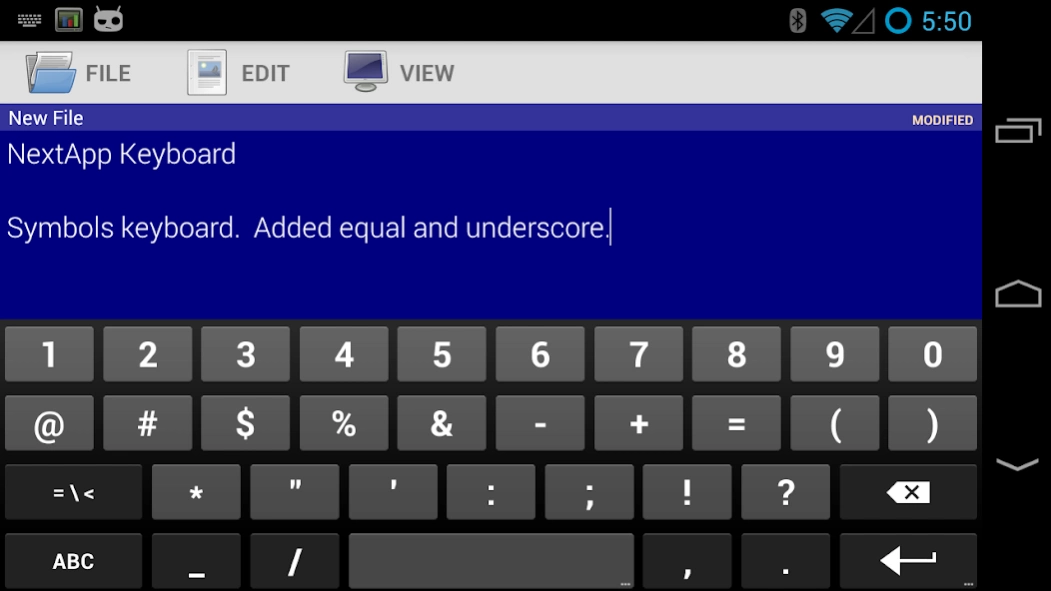

NextApp Technical keyboard with directional arrow and function keys.
The NextApp Technical Keyboard is a derivative of the AOSP keyboard, with added arrow keys and other special keys, and a slightly tweaked QWERTY layout that is closer to that of a PC Keyboard. There are multiple themes to choose from.
A "precision feedback" feature increases feedback vibration when your presses are not near the center of the keys. When autocorrection is applied, a double-pulse feedback is rendered.
This is a BETA RELEASE of this app. If you experience issues with it, please report them to android@nextapp.com. It's extremely difficult to have a conversation using the Play Store review system.
This version comes with English, French, German, Italian, Portuguese (Brazilian), Russian, and Spanish dictionaries.
I would greatly appreciate feedback on the keyboard layouts, including the arrangement of special keys on the alphabet keyboard, symbols keyboard, and function keyboards.
Function Keyboard
This keyboard includes a function key ("Fn") toward its lower left corner which can be used to access many additional keys typically found on a PC or Mac keyboard, including:
• Cursor Arrow Keys
• Page Up / Page Down
• Insert, Delete, Home, and End.
• Function F1-F12.
• Ctrl and Alt
• Tab
• Escape
The fundamental QWERTY keyboard layout has been very slightly tweaked to more closely replicate that of a PC keyboard. Specifically, the size of the left shift key has been reduced such that the third row (ZXCVBNM) is no longer overly shifted to the right. The shift key is now a standard sized key. This modification only applies to phones (the AOSP keyboard already uses this layout for tablets).
Permissions
This keyboard is based on the AOSP keyboard from Android KitKat 4.4. It uses identical permissions to that keyboard. The "read contacts" permission is used to autocomplete names from your contacts. This keyboard DOES NOT send any data to anyone.
Thank you for helping beta test this keyboard!
About Technical Keyboard
The company that develops Technical Keyboard is NextApp, Inc.. The latest version released by its developer is 0.97.
To install Technical Keyboard on your Android device, just click the green Continue To App button above to start the installation process. The app is listed on our website since 2017-08-30 and was downloaded 0 times. We have already checked if the download link is safe, however for your own protection we recommend that you scan the downloaded app with your antivirus. Your antivirus may detect the Technical Keyboard as malware as malware if the download link to nextapp.inputmethod.latin is broken.
How to install Technical Keyboard on your Android device:
- Click on the Continue To App button on our website. This will redirect you to Google Play.
- Once the Technical Keyboard is shown in the Google Play listing of your Android device, you can start its download and installation. Tap on the Install button located below the search bar and to the right of the app icon.
- A pop-up window with the permissions required by Technical Keyboard will be shown. Click on Accept to continue the process.
- Technical Keyboard will be downloaded onto your device, displaying a progress. Once the download completes, the installation will start and you'll get a notification after the installation is finished.
Program Details
System requirements
Download information
Pricing
Version History
version 0.97
posted on 2017-08-30
All features are now free, including themes and precision vibration feedback. No beta expiration.
Long pressing space now sends tab character (may be disabled via settings).
Option to always use "PC Layout" in landscape orientation.
version 0.94
posted on 2015-04-22
Beta Extension
Disclaimer
Official Google Play Link
We do not host Technical Keyboard on our servers. We did not scan it for viruses, adware, spyware or other type of malware. This app is hosted by Google and passed their terms and conditions to be listed there. We recommend caution when installing it.
The Google Play link for Technical Keyboard is provided to you by apps112.com without any warranties, representations or guarantees of any kind, so access it at your own risk.
If you have questions regarding this particular app contact the publisher directly. For questions about the functionalities of apps112.com contact us.
